

Neo Candidate Delivery is the next-generation candidate-facing experience in Cirrus, covering the candidate dashboard, exam delivery, and the score report. Use this article to understand what Neo changes, how to enable it, and how to assign it per assessment.
What Neo covers
Neo replaces the classic candidate experience with a refreshed UI across:
- The candidate dashboard.
- The exam delivery screen (the page candidates use to sit the exam).
- The score report.
What Neo improves
- Responsive design that works on desktop, tablet, and mobile.
- Accessibility improvements for a wider range of candidates.
- Cleaner section layout that makes long exams easier to navigate.
- Full exam progress visibility at a glance.
- Dark mode.
- Time alerts that notify candidates before the exam closes.
- Updated score reports with clearer results presentation.
Enable Neo on your tenant
Neo is available but not enabled by default. Request activation through either:
- Your Cirrus Customer Success Manager.
- A request through the Customer Portal.
Once enabled, Neo becomes selectable on newly created assessments.
Pick Neo per assessment
When creating an assessment, choose the Delivery version:
- V1 (Classic): the existing candidate delivery interface.
- V2 (Neo): the new candidate delivery experience.
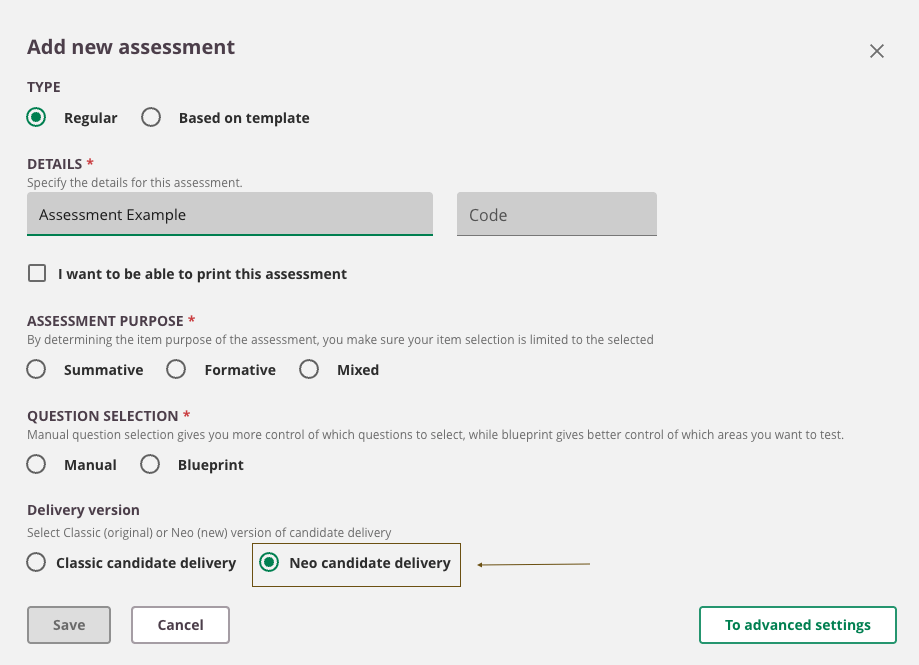
You can roll Neo out gradually and decide per assessment, with no enforced deadline.
Once Neo is enabled for your tenant, every candidate sees the new Neo dashboard at login, regardless of whether individual assessments use V1 or V2 delivery. Plan your candidate communications accordingly.
Current item type support
Neo Candidate Delivery is being rolled out incrementally. While support for additional item types is actively being added, not all item types available in Classic delivery are currently supported.
The following item types are currently supported in Neo:
- Either Or
- Multiple Choice
- Multiple Response
- Numeric
- Short Answer
- Hotspot
- Essay
- File Response
- Fill in the Blank
- Select from List
- Section
- Match
- Order
What to update when adopting Neo
Plan a refresh of candidate-facing content alongside the technical change:
- Candidate guidance (How to take an exam at the customer level).
- Support materials referencing the classic UI.
- Training content for invigilators and admins.