
Intro & finish pages
When you open an assessment form, the Intro & Finish pages tab opens by default. Use this tab to configure the introductory and finish pages, along with any additional optional pages.
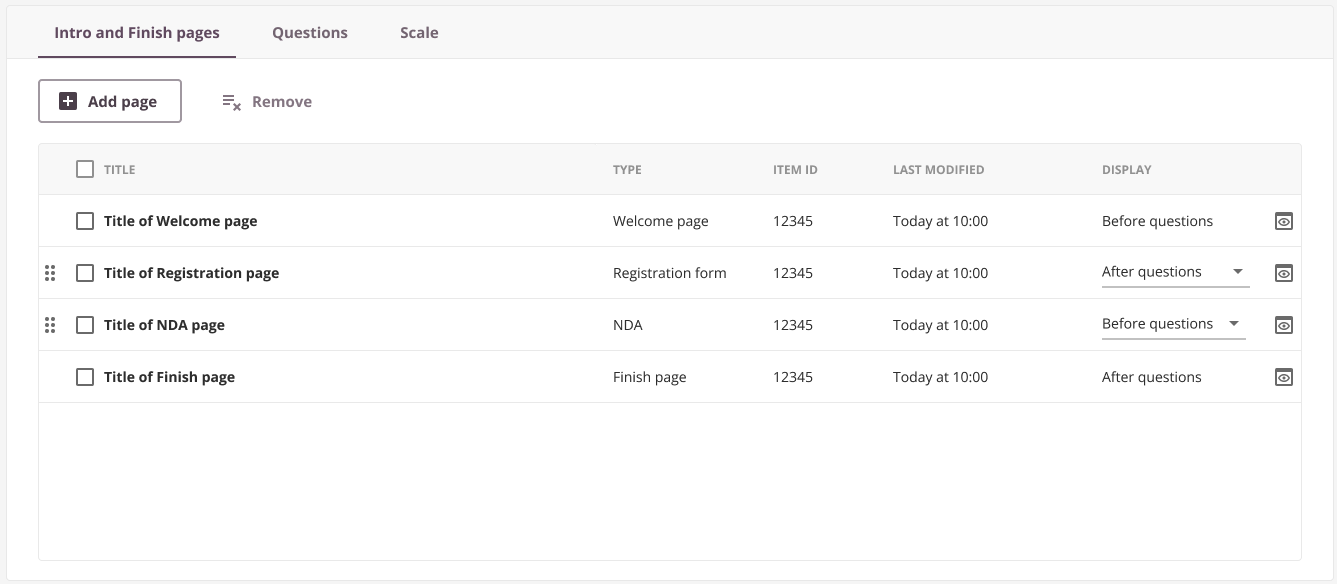
Adding a page
Click Add Page and select the type of page to include. A modal window appears where you can search for and select the desired page. Pages are created either in the library (for example, welcome and finish pages) or in the admin section (for example, NDA and registration forms). See Pages for more details on creating pages.
Specify whether the page should appear Before questions or After questions. Welcome pages can only appear before questions, and finish pages can only appear after questions. All other page types can be placed either before or after questions.
The exam timer is not affected when candidates view these pages. The timer starts only when the candidate begins answering questions and stops on submission.
Tip: Drag and drop pages to rearrange them as required.
Types of pages
Various page types can be added before or after the exam. An assessment form must have at least a welcome page and a finish page; all others are optional.
Welcome page
The welcome page is the introductory screen for candidates, displaying the assessment title, instructions, and any other information they need before starting.
Finish page
The finish page is displayed to candidates after they submit their exam. It may include information about next steps and when results will be available.
Other pages
Allows you to create additional pages containing any relevant information.
NDA
Include a non-disclosure agreement (NDA) that candidates must accept before starting their exam. The NDA text is fully customisable and can be applied on a per-booking or per-schedule basis. See Non-Disclosure Agreement (NDA) for setup details.
Registration form (survey)
Use registration forms to collect additional information or feedback from candidates before or after their exam. Registration forms can be used to:
- Gather candidate details for awarding bodies.
- Collect feedback on the assessment or specific items.
- Obtain input on your educational programme and its instructors.
See Registration Forms for setup details.