
Collections can be shared with one or more colleagues. What collaborators can do is determined by the Collection Role configuration.
Sharing permissions are configured under Admin → Roles → Collection in your Cirrus environment.
By default, Cirrus provides three roles (Author, Co-Author, Reviewer) that can be selected when sharing a collection. These can be fully customised by your system administrator.
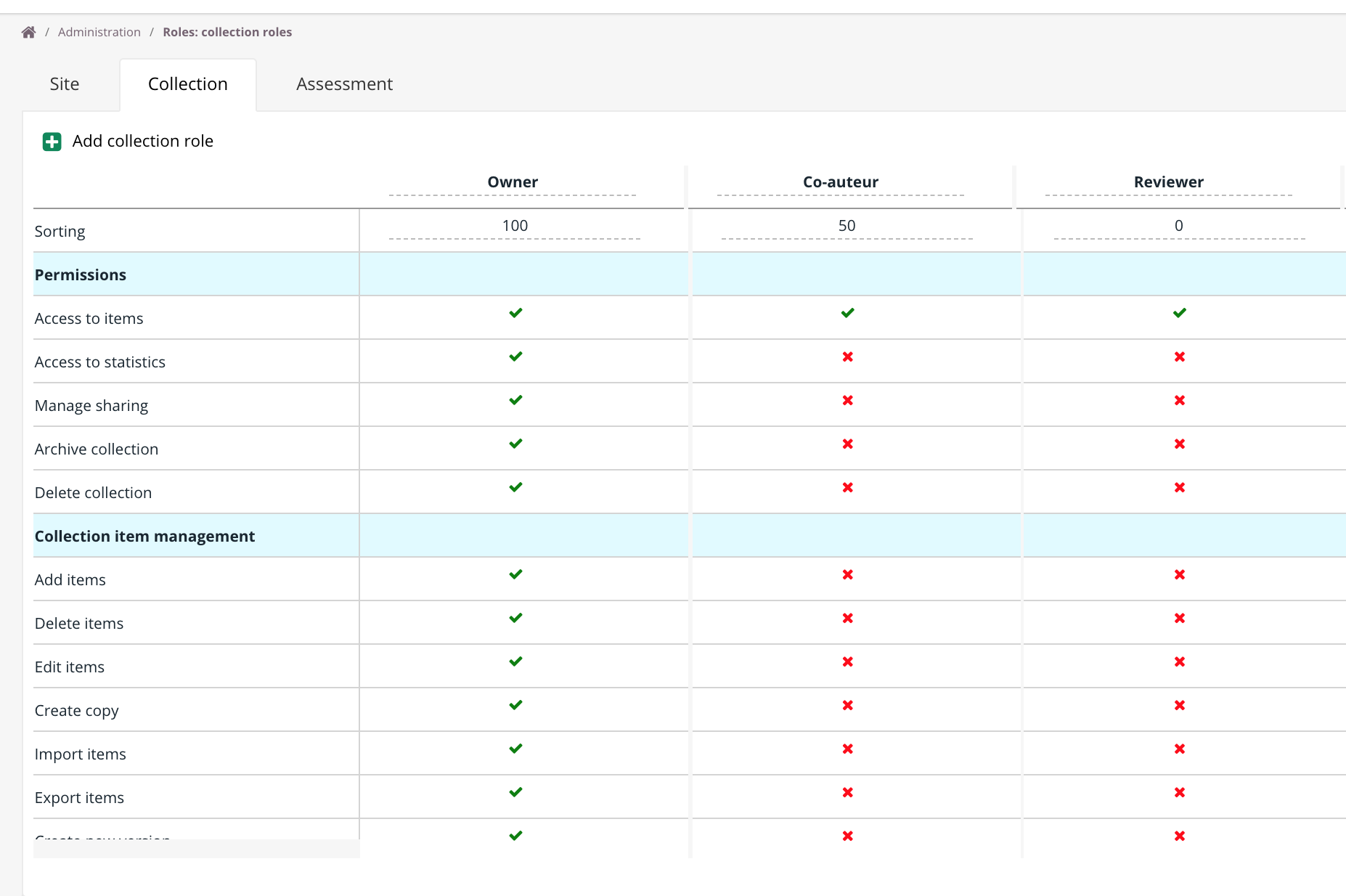
Sorting
Changing the numbers in the Sorting row adjusts the column order. This affects display order only and does not change individual roles or permissions. The role with the highest number appears leftmost in the overview. This is typically the system administrator role.
Permissions
| Permissions | |
|---|---|
| Access to items | Allows the user to access the shared items of a collection |
| Access to statistics | Allows access to the Statistics tab of the shared collection |
| Manage sharing | Enables the Share button for the collection |
| Archive collection | Allows the user to archive the shared collection |
| Delete collection | Allows the user to delete the shared collection |
Collection item management
| Collection item management | |
|---|---|
| Add items | Allows the user to add new items to the shared collection |
| Delete items | Allows the user to delete items from the shared collection |
| Edit items | Allows the user to edit items in the shared collection |
| Create copy | Allows the user to create a copy of an item in the shared collection |
| Import items | Allows the user to use the import function in the shared collection |
| Export items | Allows the user to export items from the shared collection |
| Create new version | Allows the user to create a new item version in the shared collection (for example, changing the score) |
Status management
A status can be set on each item. Live status means the item is ready for use in an assessment. Cirrus provides multiple statuses to control access for different roles.
| Available statuses | |
|---|---|
| Draft | Item is still in progress |
| Ready for review | Item can be reviewed by a co-worker or reviewer |
| Reviewed - approved | Item has been approved by a co-worker or reviewer |
| Reviewed - not approved | Item has not been approved and should be revised |
| Live | Item is ready for use in an assessment. Only Live items appear in the question selection |
| Withdrawn | Item was Live but has been withdrawn and should no longer be used. For Blueprints, withdrawn items are automatically removed from item selections |

Status management defines which statuses are visible for each collection role:
Deny: Items with this status are hidden from the collection item overview for the shared role.
Modify: Items with this status are visible and the status can be changed.
View: Items with this status are visible but the status cannot be changed.
Default role for the collection creator
A default role can be configured for newly created collections. This is typically the owner's role by default, but only one role can be set as default at a time.