

Feature: Time-based automatic schedule data deletion
Schedule data can be automatically deleted after a configurable retention period. This helps manage data retention by removing schedule data that no longer needs to be stored.
Where to find it
This option is available in the schedule Options dialog and can be enabled at any stage, whether creating a new schedule or editing an existing one.
This feature is not enabled by default. To use time-based automatic schedule data deletion, contact the Cirrus Service Desk to have it activated for your account.
Enable the Enable Time-Based Automatic Deletion toggle. Once enabled, set a notice period in days (the default is 120 days).
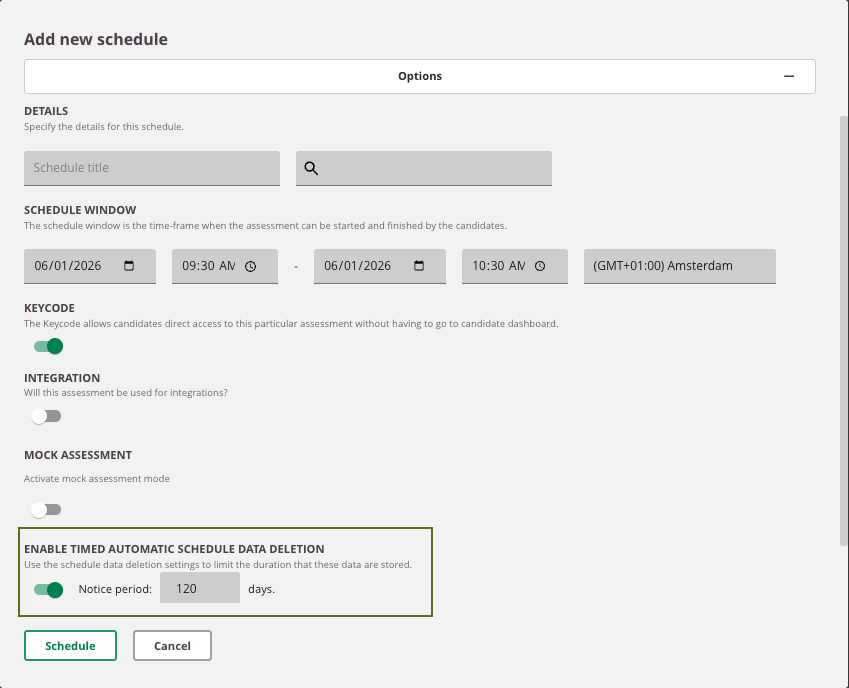
There are no restrictions based on schedule status. The feature works for Draft, Live, Ongoing, and Archived schedules.
How it works
Once the schedule has ended, the system begins counting down the configured notice period, but only after the following conditions are met:
- Schedule window has ended: The notice period begins only after the schedule's end date and time has passed.
- All results are published: If any exam results remain unpublished, the countdown does not begin.
Once the last result is published, the notice period countdown starts.
After the notice period expires, the schedule and its data are permanently deleted and will no longer be available in Reports.
What is deleted
When a schedule is automatically deleted, the following data is permanently removed:
- Reports associated with the schedule
- Schedule information under Delivery > Schedule
- Schedule information under Delivery > Invigilation
Managing the deletion setting
- To cancel automatic deletion, return to the schedule and disable the toggle. The deletion countdown stops immediately.
- If you re-enable the toggle later, the notice period restarts from that point.
API support
This feature is also supported via API. See the API Documentation for more information.