
You can create Comprehensive Integrated Puzzle (CIP) questions in Cirrus. Simply go to your Library, create or select a collection and click ‘+ Add’ or use the drop-down arrow to select this question type. You will be presented with the screen below.
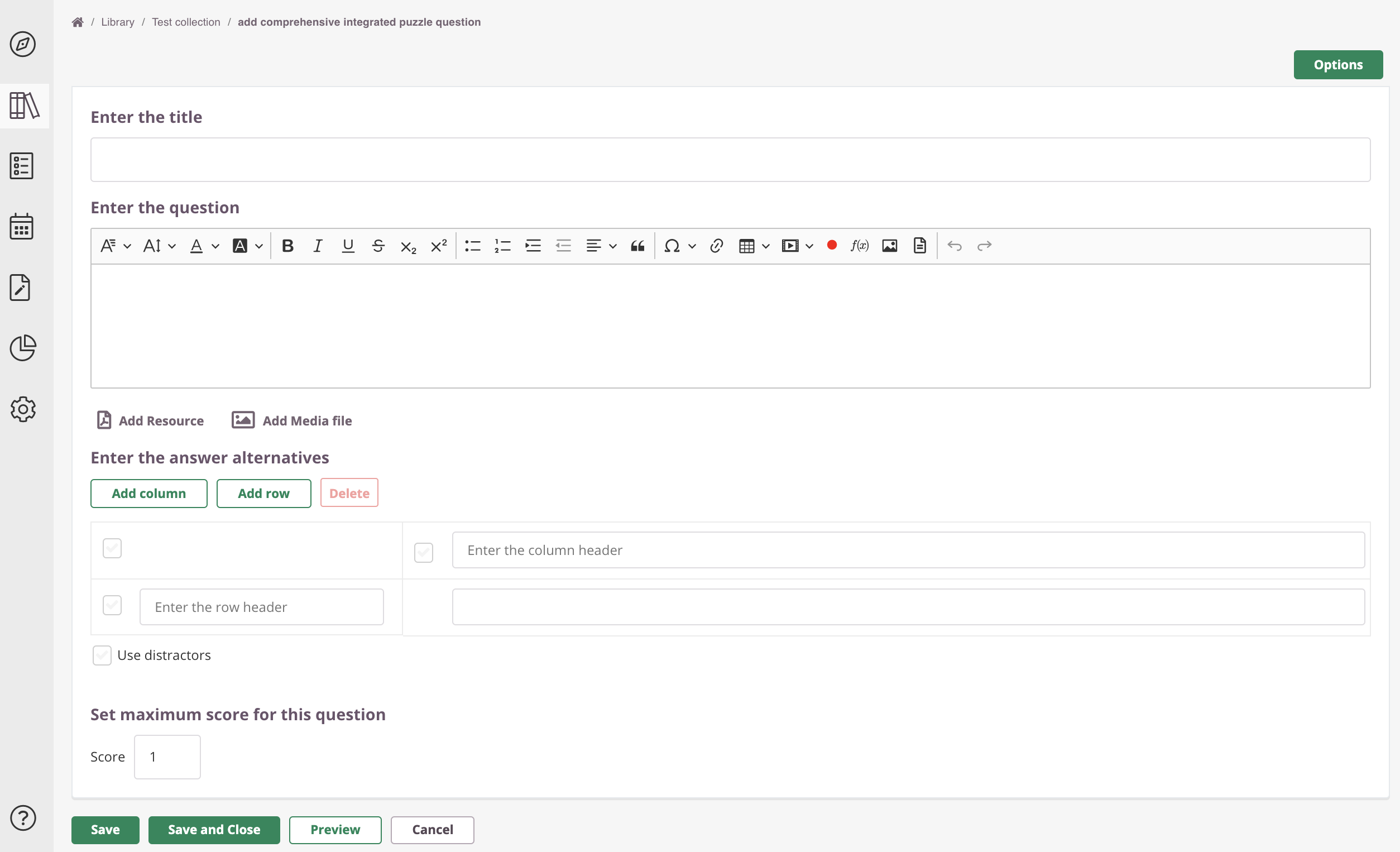 A Comprehensive Integrated Puzzle is a matrix that a candidate needs to complete. It aims to test (clinical) reasoning.
Enter the title
Write down your Item title here. This is for internal use only; this title will be visible in your Library and further in the process. This title is not visible for candidates taking their exam.
Enter the question
Click inside the text box to enter (or edit) your question. Use the text editor for a range of text editing options.
Enter answer alternatives
In the first column a diagnose, case study or patient subgroup is listed on each row. The subsequent columns are to be filled with various steps in diagnosis and/ or treatment - as categorised in the column header.
The assignment is to fill in the matrix in such a way that each row contains a coherent case.
Distractors
You can add distractors to make the question more complicated. Different distractors are separated by commas. Any alternative that contain commas must be put in quotation marks (example: "3,14", "3,16").
Set maximum score for this question
You will also have to set a maximum score for the question. Simply enter a number into the box.
Save, close, preview & cancel
- Click the ‘Save’ button to save the item.
- Click ‘Save and Close’ if you wish to return to your collection overview.
- You can use the ‘Preview’ button to see what the question will look like to the candidate and make sure that the correct answer receives the correct marks.
- Hit 'Cancel' to exit the question editor. You will be see a warning about saving the page, otherwise your data will get lost.
Options
- See this article for more information about options.
- See this article for Polytomous and Dichotomous scoring.
Extended manual
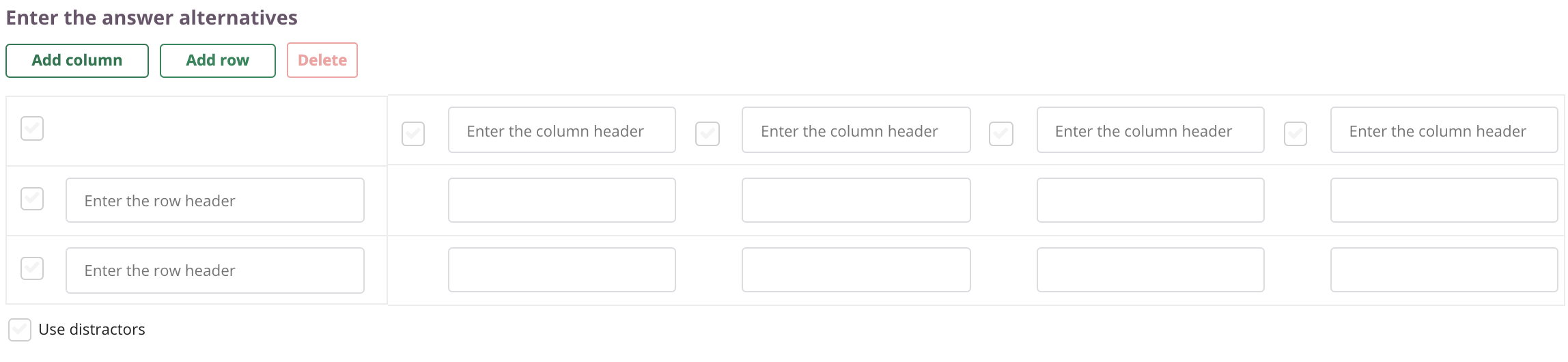 Set up the matrix with as many rows and columns as you want
Below you find an extended manual, including a more details and an example of a CIP question.
Creating a CIP question as an Author
- Selects the size of the table, for example 4x5
- Enter the headers of the 1st column and 1st row
- Enter the correct answer texts that go in each cell
- Define optional distractors per column
- Enter the maximum score for the question
- Choose the scoring method
Important:
- Multiple cells in the column can contain the same answer, such as "No deviations".
- Answer options for CIP consist of text strings. If you want to use images, consider having a look at the ordering question type.
Example case study as can be used in a CIP question
A 9 year old boy presents and his mother present themselves at the doctor’s office complaining for a tummy ache. In the standard compendium the following diagnoses can be found:
- Constipation
- Appendicitis
- Irritable bowel syndrome (IBS)
- Celiac disease
What is the best way to differentiate between these disorders?
Complete the matrix by selecting the best answer option per cell taking into account the condition listed and the options listed for anamnese, physical examination, additional examination, and treatment.
| Anamnese | Physical examination | Additional examination | Treatment | |
| Constipation | ||||
| Appendicitis | ||||
| IBS | ||||
| Celiac disease |
Anamnese
- Hard stool
- Weight loss and abdominal pain
- Pain on the lower right side of the abdomen
- Alternating abdominal pains and alternative stool patterns
Physical examination
- Abdominal examination - no deviations
- Painful right abdomen upon pressure and release
- Diffuse pain upon pressure, mostly in the left abdominal region
- Abdominal examination - hard scybala palpable over the left colon trajectory
Additional examination
- Elevated CRP
- Anti-endomysium (EMA) IgA
- Faeces-culture - no deviations
- Rectal examination - filled up ampulla recti
Treatment
- Dietary advice
- Laxatives
- Operate
- Gluten Free diet
Correct answer to our example CIP question:
| Anamnese | Physical examination | Additional examination | Treatment | |
| Constipation | (1) Hard stool | (4) Abdominal examination - hard scybala palpable over the left colon trajectory | (4) Rectal examination - filled up ampulla recti | (2) Laxatives |
| Appendicitis | (3) Pain on the lower right side of the abdomen | (2) Painful right abdomen upon pressure and release | (1) Elevated CRP | (3) Operate |
| IBS | (4) Alternating abdominal pains and alternative stool patterns | (3) Diffuse pain upon pressure, mostly in the left abdominal region | (3) Faeces culture - no deviations | (1) Dietary advice |
| Celiac disease | (2) Weight loss and abdominal pain | (1) Abdominal examination - no deviations | (2) Anti-endomysium (EMA) IgA | (4) Gluten Free diet |
Scoring examples for CIP
In the example above there are 16 cells to fill out. So let us say a 16 point max score applies.
Dichotomous scoring - if everything is answered correctly the candidate will be awarded the maximum score to be obtained (16 in our example). If there are one or more incorrect answers (or empty cells), the candidate receives 0 points.
Polytomous scoring - there are two options here.
- Polytomous - distribute the total points proportionately across the number of cells
A cell left blank or answered incorrectly results in 0 points for that cell. In our example that would lead to a score of 16-1 = 15. If two cells are switched: 16-2 = 14 points scored. - Polytomous - distribute the total points proportionately across the number of rows (2 variants):
- Any mistake in a row means 0 points for that entire row. Only if the whole row is answered correctly, the candidate receives the proportional part of the points. (4 points per row in our example above).
Example: 2 rows without mistakes / two rows with a mistake mean 4 + 4 = 8 out of 16 points scored. - If the candidate leaves one (but no more) cells empty or incorrect the candidate receives 50% of the points for that row. If the candidate leaves two or more cells empty or incorrect 0 points are awarded for that row.
Example: 2 rows without mistakes / two rows with a mistake means 4 + 2 + 4 +2 = 12 out of 16 points scored.