What is the Angoff method?
The Angoff method is a statistical technique used to set cut scores — the minimum scores required to pass a test or evaluation. It is named after William H. Angoff, who developed the method in the 1970s.
The core idea is to ask a group of subject matter experts to estimate the percentage of minimally qualified candidates who would answer each question correctly. Based on these estimates, a cut score is calculated to ensure that candidates with sufficient knowledge and skills will pass.
The Angoff method is commonly used for professional licensing exams (such as bar exams and medical licensing) and for high-stakes educational assessments.
One advantage of the Angoff method is that it incorporates the judgment of subject matter experts who deeply understand the content and skills being tested. This helps ensure the cut score is fair and defensible. Limitations include the subjectivity of expert estimates and the potential for bias.
How does the Angoff method work?
- The test developer selects a panel of subject matter experts who are representative of the candidate population.
- Panel members review each test item, consider its difficulty, and assign a probability — their expert judgment of the likelihood that a minimally qualified candidate would answer it correctly.
- The mean probability score across panel members is calculated for each item. This represents the panel's consensus on item difficulty.
- The cut score is determined by summing the mean probability scores across all items. This represents the expected total score of a minimally qualified candidate.
Angoff in Cirrus
The Angoff feature in Cirrus streamlines the cut-score setting process, increasing efficiency, accuracy, and transparency. A user-friendly interface allows experts to enter their estimates, and the system aggregates the data to calculate the final cut score.
Example: An assessment with three items, each with a maximum score of 1 point and the following Angoff values:
| Item | Angoff value | Pass mark points |
|---|---|---|
| Item 1 | 0.2 | 0.2 |
| Item 2 | 0.5 | 0.5 |
| Item 3 | 0.8 | 0.8 |
| Total | 1.5 |
The cut score is 1.5. Candidates must score at least 1.5 points to pass.
Activating Angoff
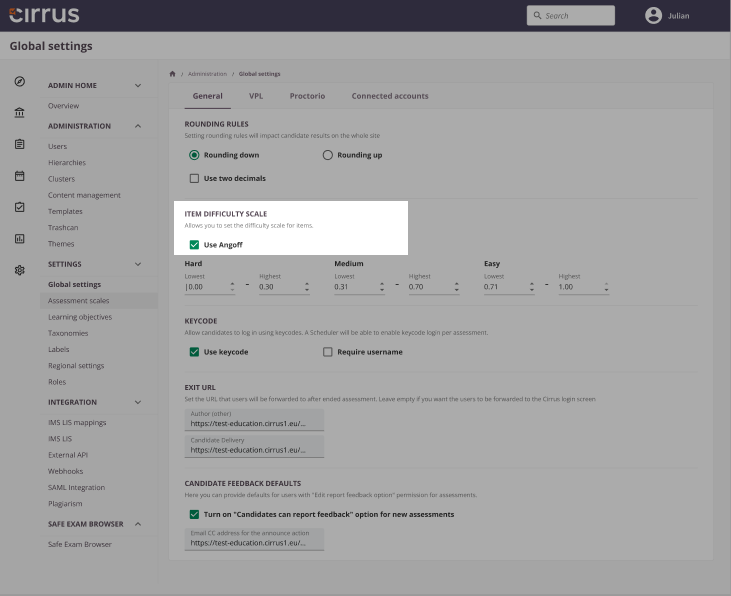
To activate Angoff, go to Admin → Global Settings. Under the General tab, find Item difficulty scale and enable Angoff.
Set Angoff values
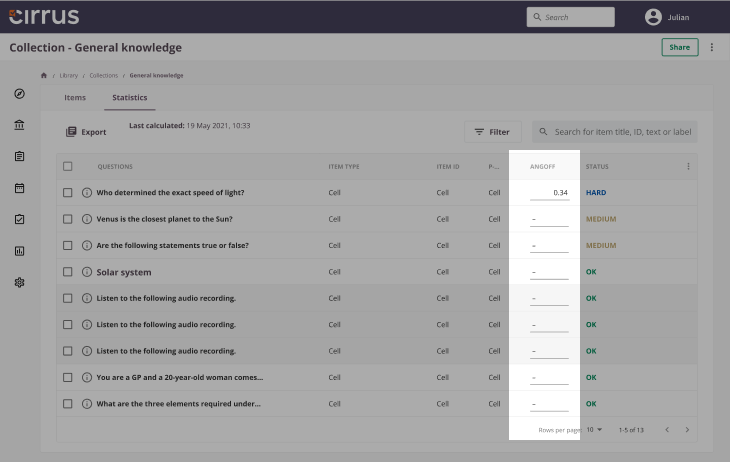
Once activated, an Angoff column appears under Library → Collection → Statistics, allowing you to set an Angoff value to 3 decimal places.
Setting a cut score using Angoff
To set a cut score, ensure all questions in the assessment form have an Angoff value. Once complete, the cut score and pass mark are set automatically.
| Item | Maximum Score (points) | Angoff value | Pass mark points per item |
|---|---|---|---|
| 1 | 6 | 0.800 | 4.8 |
| 2 | 5 | 0.500 | 2.5 |
| 3 | 6 | 0.323 | 1.938 |
| Total: 17 | Total: 9.238 |
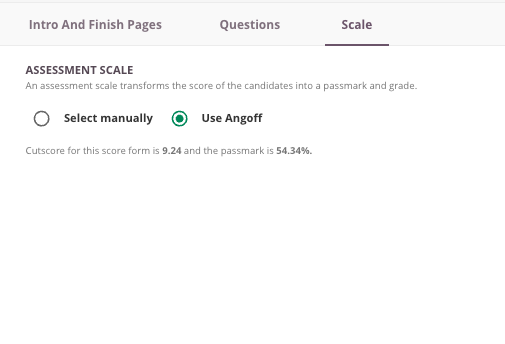
In this example, a candidate needs 9.238 or more to pass. The pass mark percentage is 54.34% (9.238 ÷ 17 × 100%).
A more difficult exam will result in a lower cut score than an easier one. If all items had an Angoff value of 1 (very easy), the cut score would equal the maximum score, requiring 100% to pass.
A key use case for Angoff is with Random forms. If some candidates receive a harder form, the cut score is automatically adjusted to account for this, ensuring fairness across different question sets.